Mettle feature — Trading Journal
The trading journal built around the review
The fastest way to log trades, attach the context only you have, and build a trading history you actually go back and learn from. Logging is the easy part — Mettle is designed for what happens after.
Start free — no cardThe problem
Most trade logs are write-only
Spreadsheets and screenshot folders capture fills, but they capture nothing about why you took the trade, what you felt, or which rule you bent. By Friday the thread is gone.
And because manual entry is tedious, the log decays exactly when you need it most: busy weeks, drawdowns, tilt days. A journal that depends on willpower to maintain stops being a journal.
How it works
- 1
Get trades in without typing
Connect a supported broker and your fills sync in automatically, or import a CSV from any broker with AI-assisted column mapping. Manual quick-add covers the rest.
- 2
Attach the context only you have
Tag each trade with the play it was supposed to follow, how you felt taking it, the plan you committed to, and notes — the inputs no broker statement contains.
- 3
Review the session, not just the trades
A structured session review walks you through the day shortly after the close: what matched plan, what leaked, and what one thing changes tomorrow.
- 4
Watch the history compound
Reviewed sessions feed your dashboard, your BRI score, and Cass's read of your trading — so month three of the journal is worth more than month one.
Key benefits
Minutes, not midnight
Sync and import do the data entry, so journaling costs minutes after the close instead of an evening of spreadsheet maintenance.
Context analytics cannot capture
Emotion tags and execution self-scores record what was happening in your head — the variable that actually drives most retail losses.
Every trade gets a page
Entries and exits marked on the candle chart, the plan, the tags, the notes — one place to answer "what was I doing here?" weeks later.
A history you reuse
Because trades are tagged to plays and sessions are reviewed, your history answers real questions: which setup pays, which habit costs.
See it in the product
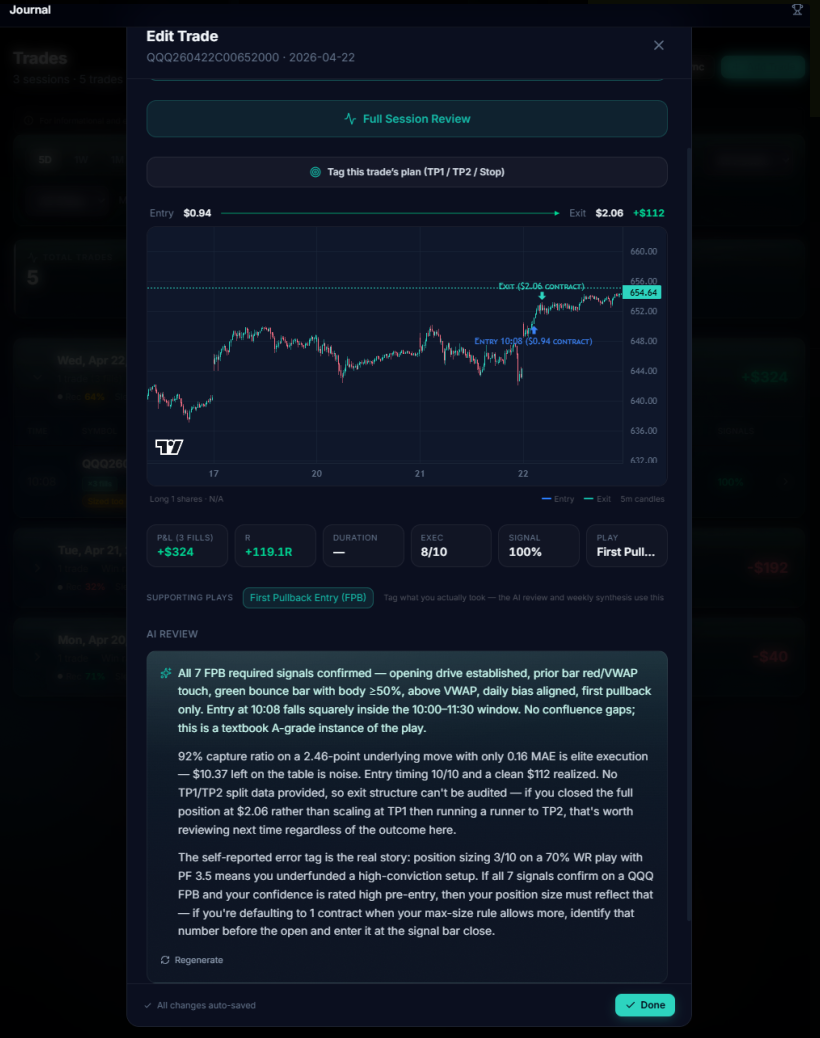
Every trade gets a page
The candle chart with your entries and exits marked, the plan you committed to, the behavioral tags, and your notes.

The dashboard
What you see when you sign in: your readiness gauge, your BRI score, candles from your last session, and the week's running P&L.
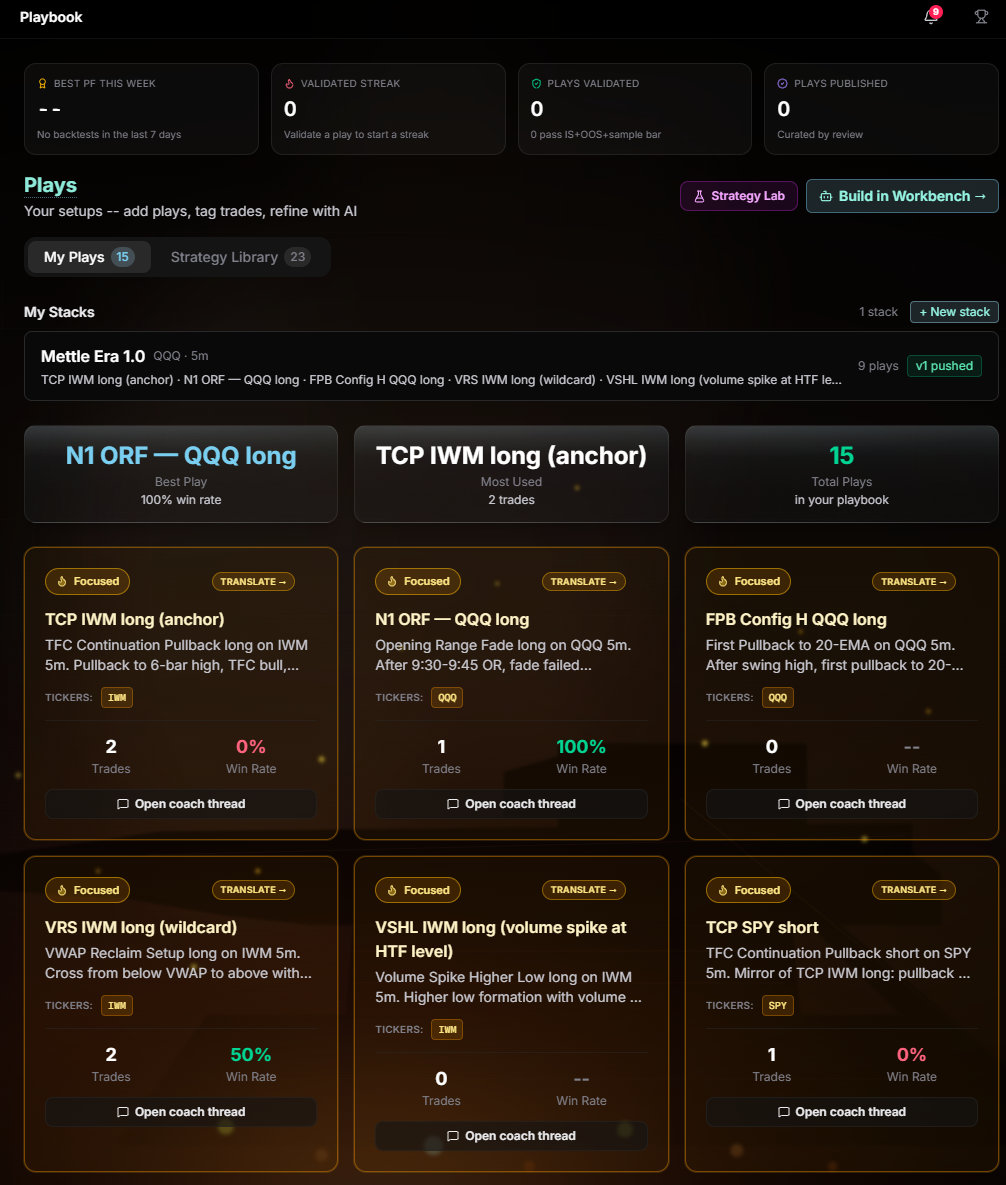
Plays written down
Every setup you trade gets a written page, so each journaled trade can be tagged back to the play it was supposed to follow.
FAQ
How do my trades get into Mettle?
Three paths: direct broker sync on supported brokers, CSV import from any broker with AI-assisted column mapping, or manual quick-add for individual trades. Most traders connect once and let sync do the work.
What makes Mettle different from journaling in a spreadsheet?
A spreadsheet stores rows; it never asks you a question. Mettle structures the review — behavioral tags, execution self-scores, a session walk-through — and then keeps that history active through your dashboard, BRI score, and Cass. The work you put in keeps paying interest.
Do I have to journal every single trade?
Sync means every trade is captured automatically; how much context you attach is up to you. The review loop is built around sessions, so even on heavy days you review once, not thirty times.
Is Mettle free to start?
Yes. You get full access free for 14 days with no card. We ask for a card only when you choose to lock in the founding rate — the invite appears around your third reviewed session, after the product has proven it earns a place in your routine.
Start your trading journal tonight
Connect a broker or import a CSV and review your first session in minutes. Free for 14 days, no card.
Start free — no cardMore features
Comparing journals? Read our honest roundup of trading journal software.